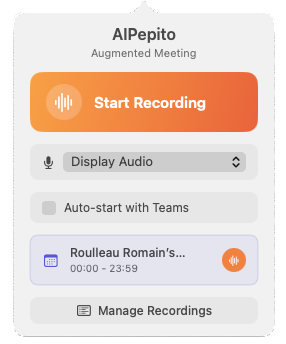
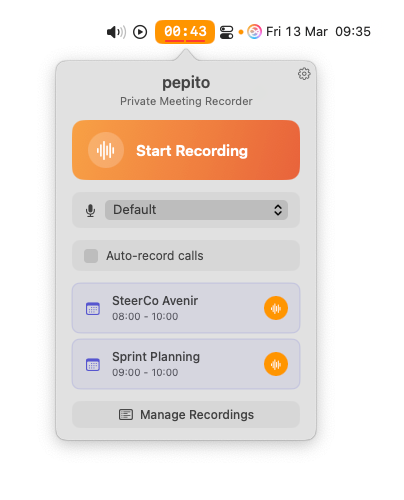
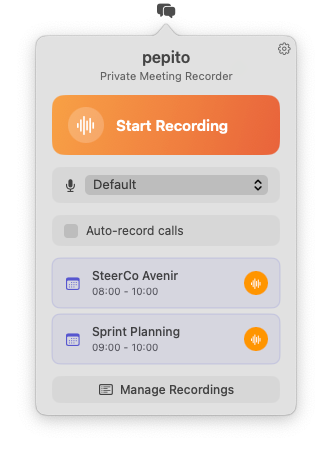
pepito menu bar interface pepito

Your meetings
stay on your Mac.

pepito records, transcribes and summarizes your meetings with AI - entirely on your device. No bot joins your calls. No audio leaves your machine. No subscription.

No bot in your calls Zero data outbound Works offline
macOS 14+ EN, FR

Built for a world where meeting data matters

Most AI meeting tools send your audio to the cloud, join your calls as bots, or require you to trust third-party servers with sensitive conversations. pepito was built to make this problem impossible by design.

Your audio never leaves

Recording, transcription and summary generation all run on your Mac. No audio file, no transcript and no meeting minutes are ever sent to an external server.

No bot, no plugin

pepito captures your Mac's system audio directly. No bot joins your call, no screen recording, no browser extension. Participants never know you're taking notes.

Works without Internet

Once the transcription model is downloaded, the entire pipeline works offline. Ideal for air-gapped networks and secure environments where Internet access is restricted.

Truly local, not just "privacy-friendly"

"Privacy-friendly" means your data isn't sold. Truly local means your data never leaves your device in the first place.

pepito Cloud-based tools Bot-based tools
No bot joins your calls Varies
Audio stays on your device
Works fully offline
No DPA required
No subscription

From recording to meeting minutes

A fully local pipeline processes your recordings in four steps. Retry any step individually if something goes wrong.

Recording

Capture system audio and microphone with a single click. No screen recording, no bot, no plugin.

Archiving

Automatically converted to M4A (AAC) for compact archiving. Configurable audio quality from 128 to 320 kbps.

Transcription

whisper.cpp transcribes audio locally with automatic language detection. Choose from 4 model sizes.

AI meeting minutes

Your configured LLM generates structured Markdown meeting minutes from the transcription.

Record a new meeting while the previous one is still processing. The pipeline runs in background, in parallel.

Everything you need. Nothing leaving your Mac.

Capture

All your meetings

Teams, Zoom, Google Meet, Webex, Slack, Discord, FaceTime - or in-person meetings via microphone. No plugin required, ever.

Auto-record calls

Detects active calls in Teams, Zoom, Webex, Slack, Discord and FaceTime. Starts recording after 10 seconds of sustained audio. Auto-stops on silence with a confirmation prompt.

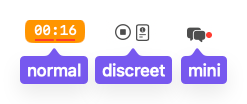
3 recording modes

Normal (orange timer with audio levels), Discreet (system-style buttons) or Mini (red dot). Real-time audio level indicators show signal strength and silence.

Intelligence

State-of-the-art local transcription

whisper.cpp embedded directly in the app. 4 models from Small to Large V3 Turbo. Automatic language detection. SRT format output.

Customizable AI summaries

Connect any OpenAI-compatible server: Ollama, LM Studio, vLLM or your corporate API. Fully editable prompt template with {{transcript}} and {{context}} placeholders. Markdown output.

Calendar context

Reads your macOS calendar via EventKit. Auto-detects the current meeting. Injects subject, participants, organizer, location and notes into the LLM context for richer summaries.

Workflow

Recordings history

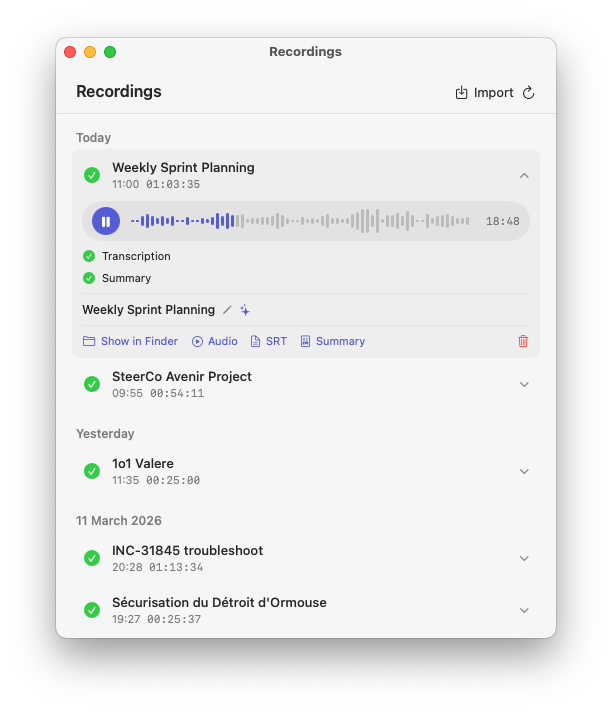
Dedicated window grouped by day. Per-step status, errors and duration. Rename, retry failed steps, open in Finder. Import external audio files (M4A, MP3).

Meeting notes

Create a Markdown note file while recording, pre-filled with date, subject and participants. Your notes are injected into the LLM context to enrich the summary.

Scriptable & enterprise-ready

Control pepito via AppleScript. HTTP/HTTPS proxy support for corporate networks. Global keyboard shortcut to start and stop recording from anywhere.

When data confidentiality is not negotiable

EU companies under GDPR

No DPA required. No data processor. No cross-border transfer.

pepito produces no personal data outside the host machine. Legal and compliance teams can approve it without a subprocessor agreement.

Regulated professions

Legal, medical, finance.

Attorney-client privilege, doctor-patient confidentiality, trading desk compliance. When audio recordings cannot leave the firm's control, pepito is the only tool that makes this structurally impossible.

Air-gapped networks

Defense, industrial, government.

No Internet required after the initial model download. Connect your internal LLM server. Reconfigure the model download URL to point to your intranet mirror.

They stopped worrying about where their data goes

Product owners, managers, assistants, engineers, sales reps... pepito adapts to every role.

“I used to spend 30 minutes after each sprint review writing up the minutes. Now it's done in 2 minutes. The time savings are huge, and nothing gets lost.”

Sophie L.

Product Owner - Fintech

“I manage three teams across different time zones. pepito lets me find every decision made in meetings, with full context. It's become essential for follow-up.”

Karim B.

Business Line Manager - Manufacturing

“I manage the schedule of four directors. With pepito, I send out meeting minutes within the hour. My directors can't believe how fast it is.”

Claire B.

Executive Assistant - Industrial Group

“As an engineer, what I appreciate is that everything runs locally. No data going through a third-party cloud. We plug in our own internal LLM and we're good to go.”

Nicolas R.

R&D Engineer - Aerospace

“After every client meeting, I have a clean summary with key points and action items. I send it to the client right away. It looks really professional.”

James M.

Sales Representative - Automotive

“We deployed pepito on 40 workstations without touching the network. No server to install, no cloud license to manage. The IT team loved it.”

Philippe G.

IT Project Manager - Insurance

From download to first summary in under 10 minutes

1

Download & launch

Install via DMG or Homebrew. An 8-step onboarding wizard guides you through permissions and preferences.

2

Download the Whisper model

Choose your model size (Small to Large V3 Turbo). Download from within the app. Works from your intranet if needed.

3

Configure your LLM

Paste your endpoint URL. Any OpenAI-compatible server: Ollama, LM Studio, vLLM, or your corporate API.

After that, pepito works automatically: it detects your calls, records, transcribes and generates summaries without any manual intervention.

Built native. Built for Apple Silicon.

Native Swift application designed to get the most out of your Mac.

Native Swift/SwiftUI application

Smooth and lightweight interface. Minimal memory footprint, deeply integrated with the system.

Background processing

The pipeline runs in the background. Record a new meeting while the previous one is being transcribed.

Per-step error recovery

Each pipeline step can be retried individually. No need to start over from scratch.

Works fully offline

No Internet connection required. Ideal for secure enterprise environments and air-gapped networks.

Safe by default

Security bookmarks for persistent folder access. Quit confirmation during active recording or processing.

macOS 14 Sonoma and later

Output formats

.wav .m4a .srt .md .json

Whisper models

large-v3-turbo large-v3-turbo-q5 medium small

Technologies

Swift SwiftUI Core Audio whisper.cpp AVFoundation EventKit

LLM

Any OpenAI-compatible

What's coming next

pepito's core pipeline is complete. These are the next differentiators.

Coming

Speaker diarization

Know who said what. The transcript will identify each speaker separately - critical for multi-participant meeting summaries.

Coming

Live transcription preview

See the transcription appear in real time during the recording. Confirm pepito is capturing correctly, without waiting for the meeting to end.

High priority

Full-text search

Search across all your transcriptions and summaries at once. Find any decision, name or action item from any past meeting.

High priority

Custom vocabulary

Teach pepito the names, acronyms and jargon of your team or domain. Fewer transcription errors on specialized content.

Frequently asked questions

Does my data stay on my Mac?

Yes, 100%. Recording, transcription and meeting minutes generation all run entirely locally. No data goes through an external server, unless you voluntarily configure a remote LLM.

How is pepito different from cloud-based meeting tools?

Most AI meeting tools send your audio to cloud servers for transcription, or join your calls as a visible bot. pepito's transcription runs with whisper.cpp embedded directly in the app. Your audio is never transmitted anywhere. There is no bot, no browser extension, no screen recording. The entire pipeline - recording, transcription and summary - runs on your Mac.

Does pepito work without an Internet connection?

Yes. Once the transcription model is downloaded, everything works offline. Only meeting minutes generation requires network access if you use a remote LLM server.

Which video conferencing tools are supported?

All of them. pepito captures your Mac's system audio, so it works with Teams, Zoom, Google Meet, Webex, Slack, Discord, FaceTime and any other tool. It also records in-person meetings via the microphone.

Which LLM can I use for meeting minutes?

Any server compatible with the OpenAI API: Ollama, LM Studio, vLLM, a corporate server or a cloud API. Simply configure the URL, API key, model and temperature in the preferences.

Is pepito GDPR-compliant?

pepito produces no personal data outside your Mac. No audio, transcript or summary is transmitted to any external server by the application itself. This means no data processor agreement (DPA) is required. If you configure a remote LLM endpoint, your own data processing obligations with that server apply.

Do I need to tell participants I'm recording?

Recording consent laws vary by jurisdiction. pepito does not handle consent on your behalf - this remains your responsibility as the user. Because pepito doesn't join calls as a bot, there is no visible "bot is recording" indicator in the call. Check your local laws and your organization's policies before recording any meeting.

What are the minimum system requirements?

A Mac running macOS 14 Sonoma or later. Apple Silicon Macs (M1 and later) offer the best transcription performance.

How does call auto-recording work?

When enabled in settings, pepito monitors selected apps (Teams, Zoom, Webex, Slack, Discord, FaceTime) for active calls. Recording starts automatically after 10 seconds of sustained audio and can auto-stop with a confirmation prompt after a configurable silence period.

Can I import existing audio files?

Yes. You can import M4A and MP3 files directly into pepito. They go through the same pipeline: transcription and AI-generated meeting minutes, with optional context you can add at import time.

Is the application free?

Yes, pepito is completely free during the launch phase, limited to 2,000 licenses. Get yours before they run out.

Your meetings. Your machine. Your data.

Free during the launch phase - limited to 2,000 licenses. No account, no subscription, no cloud.

Download for macOS

or install with Homebrew

brew install vjeantet/tap/pepito